Background
Years ago Unity deprecated their in-house networking solution, which resulted in many alternative 3rd party solutions being developed. The past few multiplayer prototypes I’ve made have used these frameworks like Mirror, Photon, and FishNet. However, within the past few years, and especially with Unity 6, they have reintroduced their own networking solution to be more integrated with the engine. Furthermore, Unity has introduced a full integrated platform to allow easier lobby creation, matchmaking, voice chat, and peer-to-peer server hosting. Therefore, when I had this project idea, I wanted to explore these tools and add them into my toolbox.
Setup
Initialization of Unity’s in house networking solution was much more straightforward than it’s alternative third party options. Within a few package imports, and domain waiting, I was able to get all the necessary packages installed. The 3 major packages I needed for this project were “Netcode for GameObjects”, “Lobby”, and “Relay”. Netcode is the main glue that allows for multiplayer functionality. If you’re not aware, mulitplayer games are actually a huge trick of smoke and mirrors. You are not actually in the same game, but rather telling everyone is telling everyone their game state and doing the best they can to sync up.
Development
In most circumstances, before you even start working with netcode, you should be relatively happy with a basic player controller and camera system that elicits the idea you’re looking for. In other games where networking is the crux of the application, i.e. MMOs, it may be better to start with networking tests with no player controllers, just transforms to prove network loads, synchronization, latency, etc. However, in my case, I developed a simple dog-fighter controller that uses a simplified version of flight controls that don’t rely on true rigidbody physics. After that, I set up a standard network scene with a NetworkManager that had a Player network prefab, and Unity’s transport. After a quick build, boom! I had two separate clients working together and moving around in the same scene. If you’re comfortable with Unity, it’s really not that hard to get a basic networked scene working. The challenging part is that no game is this simple, and every multiplayer game faces new challenges you wouldn’t face on a non-networked game.
Complications
- Local player’s ship jitter
- Non-local player’s position jitter and desync
Local Player Camera Jitter
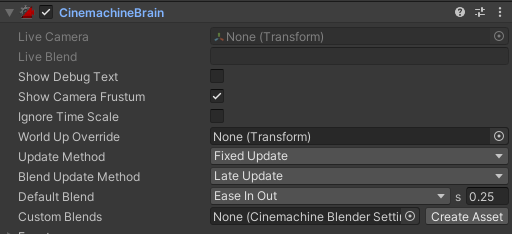
An initial challenge I faced was that of local player jitter from a Cinemachine virtual camera struggling to catch up appropriately. What I didn’t understand is that when the virtual camera updates every frame, it needs the target’s position, in our case the player ship, and calculates it’s position relative to that. My ship code was being executed in the FixedUpdate loop and the virtual camera was occurring in the Update loop. For those unaware, FixedUpdate and Update are two distinct update loops that differ in one key way, their time interval of execution. Update will occur as fast as the application will allow it to run based on hardware constraints, while FixedUpdate occurs at a, go figure, fixed time rate. That means that in most occasions, FixedUpdate and Update will be not happening at the same time. As a result of this, if there is logic in one that relies on another, it can cause issues.
Once I understand the root cause of this issue, solving it was quite easy. As long as my movement logic takes place in FixedUpdate, so too would my virtual camera have to execute in FixedUpdate. Once I changed that, the virtual camera and the ship’s position were operating in the same update cycle, which fully eliminated the local player’s stutter.
Non-Local Player Position Offset & Jitter
The bigger issue I faced was the ship position desync and massive stutter, or jitter, of non-local player ship movement. Given that these ships are traveling at fast velocities, by the time the client received the correct other player’s locations, those players are already at a much different position. This project was an opportunity to understand how networking works and not be an expert at it right away, so unfortunately getting from this understanding to a solution was a couple of weeks of trial and error.
The first attempt built an entire system for a fully server authoritative movement system with local client prediction. I thought that the positional stutter was coming from all the player’s not syncing their local positions with the server correctly. Therefore, with a full server-auth system, I figured there would be a latency from input to movement, but I thought that the stutter would disappear. After a couple days of working through these videos, the problem was still there. Even though all the movement was calculated on the server, each client was still receiving updates too infrequently and then stuttering. I did learn a ton from this video series, specifically how to create a system to sync an input payload across clients, which I use later for the ship tilt mechanic.
For the next try, I searched Unity’s Asset Store and came across Smooth Sync. The videos and reviews were very promising, especially since the promo video showed off space travel syncing really well. However, after a couple hours experimenting with the asset, I decided to keep searching. I believe this still could work, but it wasn’t the plug and play functionality I was hoping for. The asset was obviously made to be able to be customized for each game’s need but I was having trouble working it into the already established system.
After looking under the hood of “Smooth Sync” and finding this video, I was able to understand the problem I was facing. I then spliced together some code with those two approaches in mind and was finally able to get a fast moving player controller that syncs decently well across player’s clients AND almost no jitter problems. Ultimately, I used a basic extrapolation system while also doing local client-authoritative movement then telling the other clients my position, rotation, and velocity. To be fair, this might not be the most efficient and may take up some network packets every frame but this project needs to stay in scope.

Lobby & Relay
Once I solved the player sync problems, I felt confident moving forward with the next steps, setting up player lobbies. Setting up “Lobby” was pretty straight forward and there is good documentation online to help it get going. One of the interesting things is that in order for the lobby to stay live on Unity’s services, you have to send a periodic heartbeat. I suppose that makes sense from Unity’s perspective; if a lobby loses it’s heartbeat, it’s a waste of resources to keep it hosted on their cloud. With the lobby system integrated, players would be able to host and join their own lobbies with ease. However! Most home networks would immediately block this from occurring because of common firewall rules. As a result, Unity also has a service called Relay which allows users to overcome these issues and without a dedicated server. Even better than that, Relay was the easiest part to make work. It’s integration was pretty seamless and only required a few lines of code and changing the network transport to Unity Relay. After all of this was said and done, I was able to get clients across different PCs to host and join their own lobbies and fly around seamlessly together without any de-syncing or jitter!
Conclusions
- Understanding the core networking concepts, as well as Netcode’s capabilities, is key to making this process as smooth as possible. I’ve worked on 3 networked projects before this. While all their concepts were similar, it’s important to understand the tools you’re working with.
- Lobby & Relay are super easy and fast to set up. I can’t speak to their integration with other gaming platforms like Steam. However, as an isolated lobby system, it’s great to work with.
- Sometimes you have to strip down all of your code to it’s simplest state and work back up to figure out what’s causing your issue
- Oh, and the resources online these days are incredible (YouTube, Reddit, even ChatGPT is a good rubberduck tool).
- Synchronizing scene changes is a pain!
Thanks for reading and wishlist my game on Steam so you can try it out when I release it!
 Dan Weber
Leave a comment